반응형

잡담.

MCP 서버를 내가 외부에 제공한다고 했을 때, 여러 방법이 있을 것 같다.

가장 먼저 생각나는 건 서버 코드를 공유하고 stdio 실행 방식으로 제공하는 방식, 그리고 또 다른 방법은 웹서버를 띄워 StreamableHTTP 방식으로 제공하는 것이다.

MCP 서버를 직접 운영하면서 오픈한다는 의미는 인증과 인가를 붙이겠다는 의미일 것 같다.

AWS Lambda 환경에서 MCP 서버를 배포할 경우 아래의 장점이 있다.
- 인프라 관리가 불필요하여, 서버 운영 부담이 없다.
- 사용한 만큼 비용이 지불되기 때문에 비용 효율성이 높다.
- 자동으로 스케일링이 되기 때문에 트래픽에 따라 h/w 자원을 동적으로 변경할 수 있다.
- 보안 및 권한 관리가 쉽고, 도메인 주소관리, SSL 관리 등의 네트워크 리소스 운영 작업이 편하다.

단점도 있다.
- 최대 실행시간과 메모리 제한이 있고, 로깅과 제어가 제한적이다.

이 포스팅의 목적은 비교적 최근에 나온 MCP 서버를 AWS Lambda 환경에서 MCP 배포가 가능할지 확인해보기 위함이다.


그럼 시작해보자.


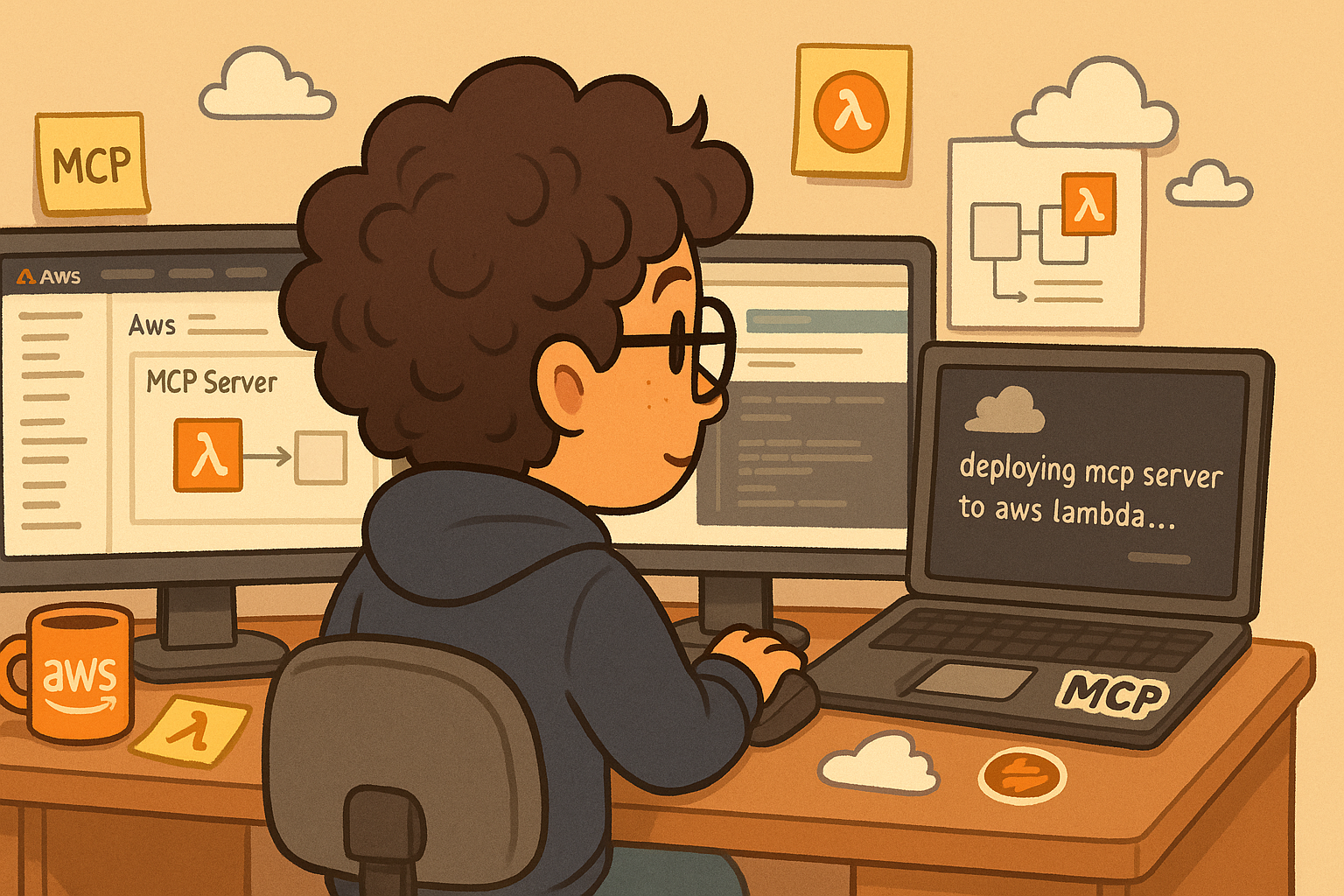
AWS Lambda 에서 MCP 서버 구축 해보기

A) 사전 준비

  • fastMCP 로 구현한 mcp server 코드
  • 컨테이너 이미지 로 생성할 Dockerfile 코드
  • requirements.txt 패키지 설치 파일

B) 시나리오 

1. teams webhook 을 이용해 message 를 발송하는 MCP 서버 구축
2. mcp 서버를 컨테이너 이미지로 생성하고, ECR 레포지토리에 업로드
3. aws lambda 를 생성하고 ecr 에 업로드 된 이미지를 이용하여 배포 
4. 아래 두 가지 방식으로 MCP Server 테스트를 한다.

  a. Lambda 의 FunctionURL 을 이용해 MCP Client 로 연결하여 Teams 채널로 메세지를 전송해본다.
(LLM 모델은 로컬에서 테스트를 위해 Ollama 모델을 활용)
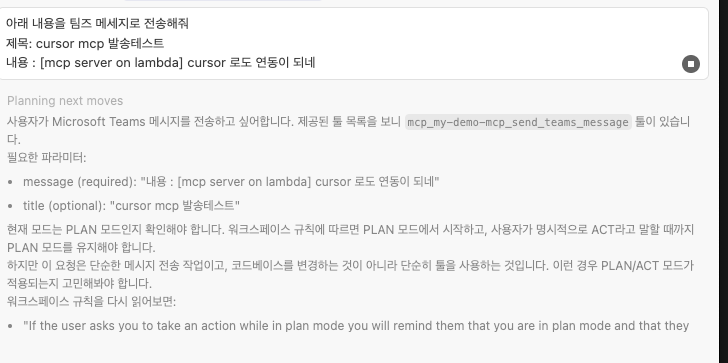
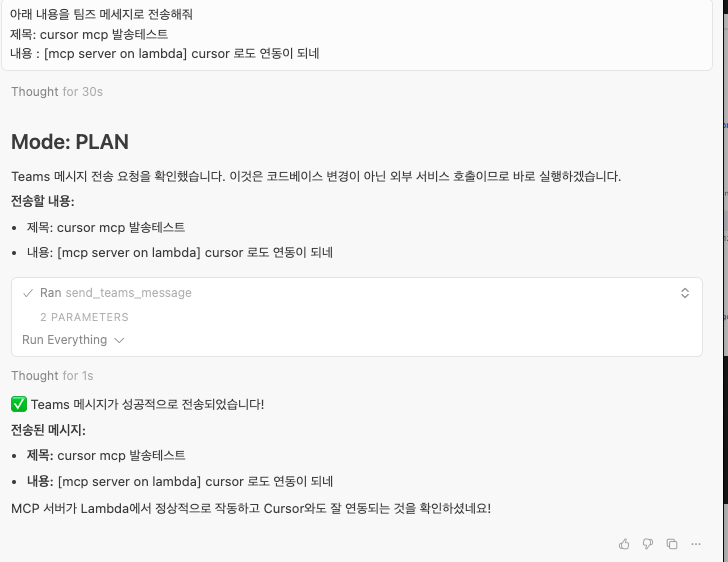
  b. cursor 의 MCP tool 로 등록해서 Teams 채널로 메세지를 전송해본다.


C) Step by Step

MCP 서버 코드 

from fastmcp import FastMCP
import os
import requests
import json
from typing import Optional, Dict, Any
WEBHOOK_URL = "웹훅 주소"
mcp = FastMCP("MCP-TEST-SERVER")

@mcp.tool()
async def get_my_info() -> str:
    """ 안녕하세요. 저는 러닝을 좋아하는 jssvs 입니다."""
    return f""

@mcp.tool()
async def get_weather() -> str:
    """현재 날씨를 조회합니다"""
    return f"오늘 날씨는 맑습니다."


@mcp.tool()
def send_teams_message(
    message: str,
    title: str = None,
) -> bool:
    """
    Microsoft Teams 채널에 webhook을 통해 메시지를 전송합니다.
    
    Args:
        message (str): 전송할 메시지 내용
        title (str, optional): 메시지 제목
    Returns:
        bool: 전송 성공 여부
    Example:
        send_teams_message(message="안녕하세요!", title="알림")
    """
    color = "00FF00"
    # MessageCard 형식으로 페이로드 구성
    payload = {
        "@type": "MessageCard",
        "@context": "https://schema.org/extensions",
        "summary": title or "알림",
        "sections": [{
            "activityTitle": title,
            "text": message
        }]
    }
    
    # 색상이 지정된 경우 추가
    if color:
        payload["themeColor"] = color
    
    # 제목이 없는 경우 섹션에서 제거
    if not title:
        del payload["sections"][0]["activityTitle"]
    
    try:
        response = requests.post(
            WEBHOOK_URL,
            headers={"Content-Type": "application/json"},
            data=json.dumps(payload)
        )
        
        # 성공 여부 확인
        if response.status_code == 200:
            print(f"✓ 메시지 전송 성공")
            return True
        else:
            print(f"✗ 메시지 전송 실패: {response.status_code}")
            print(f"응답: {response.text}")
            return False
            
    except Exception as e:
        print(f"✗ 오류 발생: {str(e)}")
        return False

def main():
    host = os.environ.get("HOST","0.0.0.0")
    port = int(os.environ.get("PORT",8080))
    print(f"Starting FastMCP HTTP Server on {host}:{port}")
    print("Available tools:")
    print("- get_bdp_team_info: Returns BDP team information")
    print("- get_weather: Returns weather information")
    print(f"Server accessible at: http://{host}:{port}")
    mcp.run(transport="http",host=host, port=port, stateless_http=True)

if __name__ == "__main__":
    main()

requirements.txt

fastmcp>=0.1.0
requests


Dockerfile

FROM python:3.12-slim
WORKDIR /app

# ### Environment Variables
ENV PYTHONDONTWRITEBYTECODE=1
ENV PYTHONUNBUFFERED=1


# Install the specified packages
COPY requirements.txt .
RUN pip install --no-cache-dir --upgrade pip && \
    pip install --no-cache-dir -r requirements.txt

# MCP 서버 코드 복사
COPY mcp_server.py .

# 환경 변수 설정
ENV PORT=8080
ENV AWS_LWA_INVOKE_MODE=response_stream
ENV AWS_LWA_READINESS_CHECK_PORT=8080
ENV AWS_LWA_READINESS_CHECK_PATH=/health

# === Lambda Web Adapter ===
COPY --from=public.ecr.aws/awsguru/aws-lambda-adapter:0.7.0 /lambda-adapter /opt/extensions/lambda-adapter

# 서버 시작 명령어
CMD ["python", "mcp_server.py"]


D) 참고해야 할 부분 !

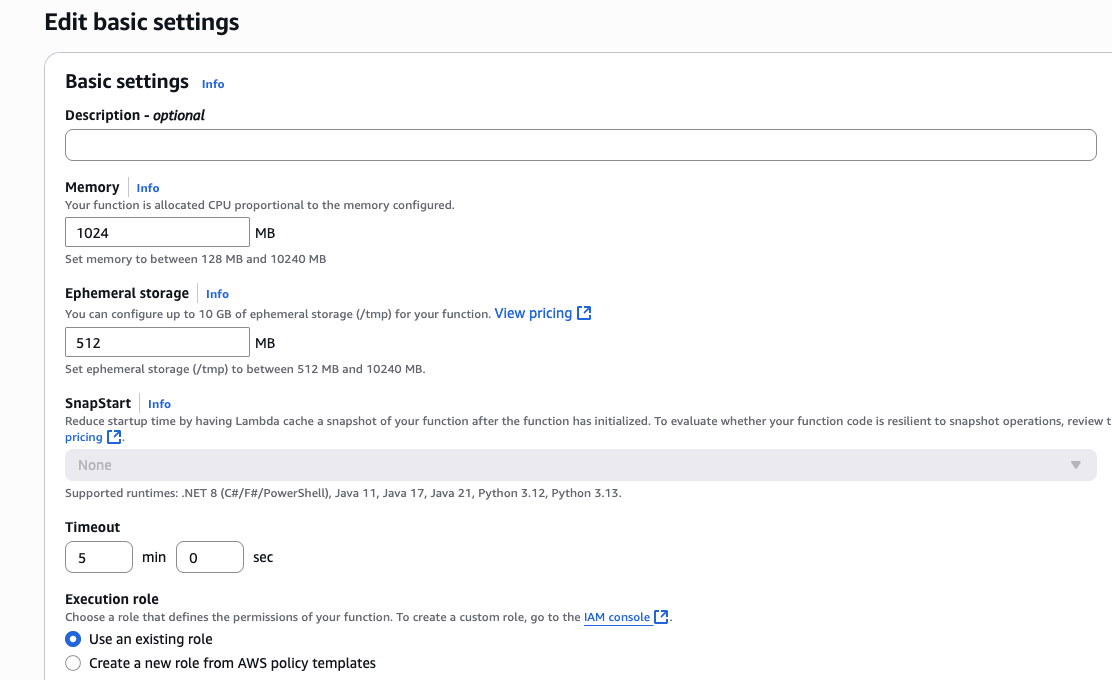
1) Lambda 설정 시 참고 
-> 환경변수에 2개의 값 추가 (Dockerfile 에 ENV 에 추가해줬다면 생략해도 된다.)

2) 기본 TImeout 값으로는 MCP tool 호출이 되기 전에 호출이 종료되기 때문에 값을 조정한다.


E) 테스트 해보기


A) Strands Agent 코드를 작성하여 테스트 발송

from strands import Agent
from strands.models.ollama import OllamaModel
from strands.tools.mcp.mcp_client import MCPClient
from mcp.client.streamable_http import streamablehttp_client


client = MCPClient(
    lambda: streamablehttp_client(
        # url = "http://127.0.0.1:8080/mcp"
        url = "https://LambdaFunctinURL 주소.lambda-url.ap-northeast-2.on.aws/mcp"
    )
)
with client:
    tools = client.list_tools_sync()
    
    base_model = OllamaModel(
        host = "http://localhost:11434",
        model_id = "llama3.1:8b",
        temperature = 0.1
        )
    agent = Agent(tools = tools, model = base_model)
    # print(agent.tool.get_weather())
    result = agent("teams 채널에 아래 메세지를 전송해줘 \n message : Lambda 에서 구축한 MCP 서버 테스트 \n title : MCP 서버 테스트")
    print(result)

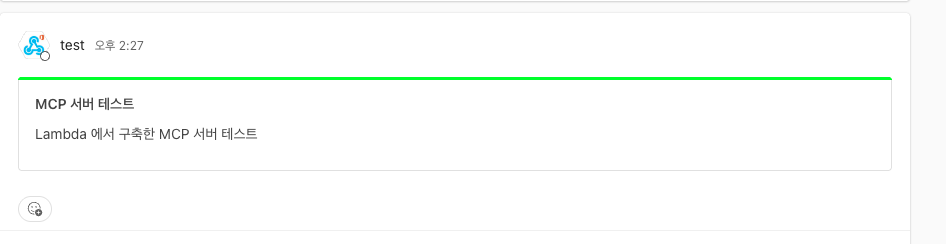


B) Cursor MCP 툴 연동하여 테스트 발송



결론

  • lambda 의 장점은 서버리스, 즉 물리 서버를 운용하지 않으면서 서비스를 배포하는데 있다. 그렇다면 MCP 서버 역시 이런 장점을 누릴 수 있다.
  • 내가 테스트한 부분은 운영 버전용으로 활용할 수 는 없다. 운영 버전까지 고려할 때는 보안을 위해 VPC 안에서 배포를 한다던지, 앞단에 Gateway 의 셋팅, 동시성 테스트 등 다양한 준비가 필요하다.
  • 그리고 Dockerfile 을 보면 알겠지만, lambda web adapter 를 멀티스테이지 빌드를 사용하여 로드한 부분이 있는데, lambda 의 extension 기능으로 붙인 것이다. 즉 기능 추가, 의존성 등의 확장에 있어 제한이 있을 수 있음을 의미한다.

참고

[1] Welcome to FastMCP 2.0 - https://gofastmcp.com/getting-started/welcome 
[2] GitHub - awslabs/aws-lambda-web-adapter - https://github.com/awslabs/aws-lambda-web-adapter 
[3] Deploy MCP Server on AWS Lambda | Step-by-Step Guide - https://www.youtube.com/watch?v=JncV8hXuyRg&t=341s 
[4] 컨테이너 이미지로 Python Lambda 함수 배포 - Python용 AWS 기본 이미지 사용 - https://docs.aws.amazon.com/ko_kr/lambda/latest/dg/python-image.html#python-image-instructions
반응형
반응형


오늘은 Strands SDK 로 개발하는 Agent 의 도구에 MCP tool 을 붙여보겠다.


일단 MCP 도 Agent 의 하나의 tool 에 불과하다는 개념을 다시 기억하자.


MCP 구성은 Server 와 Client 두 가지 구현이 필요하다.


MCP Server 는 필요에 따라 직접 구현보다는 IDE 에서 시켜서 구현할 수 있고 ( 필자의 경우 Cursor 를 이용해서 쉽게 mcp 서버를 구현할 수 있었다.) 외부에 공개된 MCP 서버를 직접 사용할 수 있다. 다만 remote 서버의 경우 datasource 에 대한 정보들이 네트워크 트래픽을 타고 외부에 넘어갈 수 있으니 보안에 유의하자.


일단 아래 aws 에서도 aws 서비스에 access 할 수 있는 도구들을 mcp 서버로 제공하고 있다. 

- https://awslabs.github.io/mcp/


Welcome to AWS MCP Servers | AWS MCP Servers

Get started with AWS MCP Servers and learn core features.

awslabs.github.io


그리고 내가 일반적으로 Smithery 에서도 설치가 가능하지만, 설치가 잘 안될 때는 아래 cursor 의 mcp 페이지에서도 설치해보면 된다.

https://docs.cursor.com/ko/tools/mcp


Cursor: The best way to code with AI

Built to make you extraordinarily productive, Cursor is the best way to code with AI.

cursor.com


Strands SDK 에서의 MCP Client 요약

  • Strands SDK 에서 쉽게 MCP Client 를 구현해줌
  • MCP 클라이언트를 생성할 때 어떤 방식으로 연결할 것인지 선택해야 함
    • Standard I/O (stdio) : 로컬 프로세스를 구현한다면 적합
    • Streamable HTTP : HTTP 이벤트를 호출해서 스트림 방식으로 구현할 때
    • Server-Sent Events (SSE) : HTTP 기반의 서버를 직접 구축했을 때
    • Custom Transport with MCP Client - 그외 직접 프로토콜을 구현할 때


많이 활용하는 stdio , streamableHTTP 방식의 예제 코드를 아래에 첨부한다.


예제 코드 내용

  • Agent 모델을 만듦.
  • sequential-thingking  mcp 도구 등록.
  • strands tools 에서 기본으로 제공하는 http_request 를 이용해 openweather api 의 도큐먼트 페이지를 분석시킴.


from mcp import stdio_client, StdioServerParameters
from mcp.client.streamable_http import streamablehttp_client
from strands import Agent
from strands.models import BedrockModel
from strands.tools.mcp import MCPClient
from strands_tools import http_request, retrieve

base_model = BedrockModel(
    model_id="apac.anthropic.claude-3-7-sonnet-20250219-v1:0",
    region_name="ap-northeast-2",
    temperature=0.3,
)

stdio_mcp_client = MCPClient(
    lambda: stdio_client(
        StdioServerParameters(
            command="uvx",
            args=["awslabs.aws-documentation-mcp-server@latest"]
        )
    )
)

# HTTPStreamable 방식으로 붙일 경우 
# sequential_thinking = MCPClient(
#     lambda: streamablehttp_client("https://smithery.ai/server/@smithery-ai/server-sequential-thinking")
# )


# StdIO 방식으로 붙일 경우
sequential_thinking = MCPClient(
    lambda: stdio_client(
        StdioServerParameters(
            command="npx",
            args=[
                "-y",
                "@smithery/cli@latest",
                "run",
                "@smithery-ai/server-sequential-thinking",
                "--key",
                "생성된 사용자 키",
                "--profile",
                "생성된 사용자 프로필"
            ]
        )
    )
)
# 예제 테스트 코드 
with sequential_thinking:
    tools = sequential_thinking.list_tools_sync()
    tools += [http_request, retrieve]

    agent = Agent(tools=tools, model=base_model)
    result = agent("https://openweathermap.org/forecast5 에서 어떤 날씨 데이터 테이블을 수집할 수 있는지 분석해줘")
    print(result)

# with stdio_mcp_client:
#     tools = stdio_mcp_client.list_tools_sync()
#     agent = Agent(tools = tools, model = base_model)
#     result = agent("What is AWS Lambda?")
반응형
반응형

목차

  • MCP 란 무엇인가 ?
  • MCP 로 뭘 할 수 있는가?
  • MCP 는 어떻게 동작하는가?
  • MCP 의 실체를 알아보고 직접 server 를 만들어보자

1.MCP 란 무엇인가?


  • MCP = Model Context Protocol, 대형 언어 모델 LLM 이 외부 데이터 및 기능과 상호작용할 수 있도록 돕는 공개 프로토콜
  • 부연 설명 !! 2024년 11월 calude 로 유명한 Anthropic 에서 발표한, LLM Agent 가 다른 프로그램과 연동하기 위한 프로토콜이다.
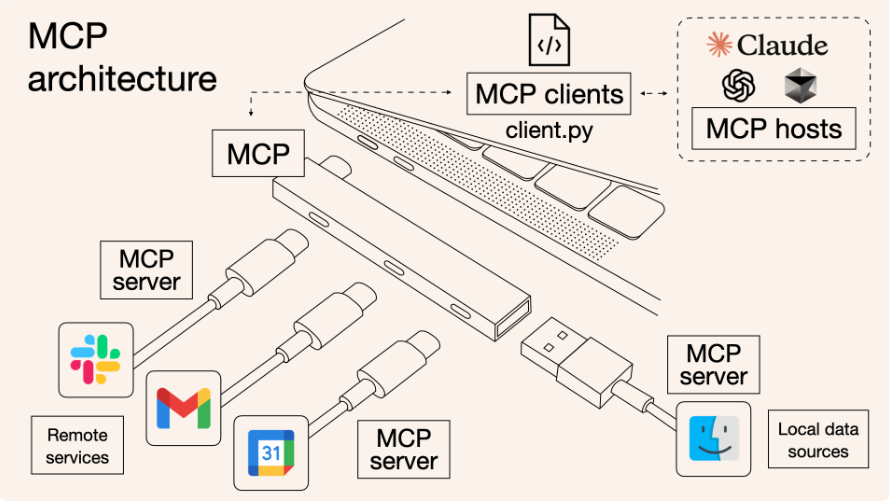
  • 사람들이 쉽게 예를 들어 설명할때 AI USB 로 표현하기도 함
  • AI 가 더 똑똑해지려면 단순한 훈련 데이터에 의존하지 않도록 해야 하는게 필수. 외부데이터를 안전하게 가져와야 하는 방법이 필요했다 그래서 탄생하게 된게 MCP


2.MCP로 뭘 할 수 있는가?


  • 주요 역할
    • LLM 이 파일, 데이터베이스, API, 시스템 정보 등에 접근 가능
    • 사용자 허가를 통해 안전한 데이터 이동
    • 다양한 LLM 에서 공통적으로 사용할 수 있는 표준 인터페이스 제공
  • 기존에는 AI 가 사전에 학습된 정보에만 의존해야 했지만, MCP 를 사용하면 실시간으로 외부와 연동하여 최신 데이터를 가져와 활용할 수 있다.

3.그래서 MCP는 어떻게 동작하는가?

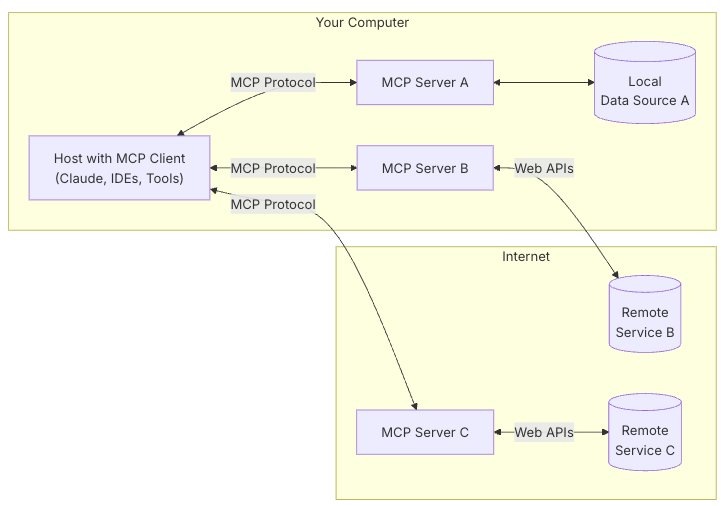
A. 주요 아키텍쳐 컴포넌트

  • MCP Hosts
    • LLM 모델을 이용하는 AI Tool
    • IDE, Claude Desktop,
  • MCP Client
    • 서버와 1:1 로 연결하는 프로그램 클라이언트
    • LLM 이 실제 실행되는 주체. 다양한 도구나 서비스를 사용할 수 있또록 요청을 보내는 쪽
  • MCP Server
    • 모델의 문맥을 교환할 수 있는 프로토콜로 통신하는 경량화된 프로그램
  • Local Data Sources
    • 컴퓨터 파일, DB 등의 서비스
  • Remote Services
    • 인터넷 API 를 통해 연결 가능한 외부 서비스들


B. 동작흐름

  • 클라이언트는 서버에 연결 요청을 보내고, 서버는 승인하여 통신 채널을 설정한다.
  • 사용자의 요청을 MCP Client 가 MCP Server 를 통해 요구하는 사양에 맞는 내용의 데이터를 반환 받고, LLM 제공자( sonnet, grok, gemini, gpt 등) 에게 전달하여 분석과 처리를 한다.

4. MCP 서버의 실체를 알아보고, 직접 만들어보기

A.개발환경 설정

  • MCP SDK 설치
  • MCP 서버 코드 작성
  • MCP 서버 실행 & Inspector 로 테스트
  • Cursor에서 연동해보기

B.시나리오 설정

  • AI Tool (MCP Host) 가 MCP 에 연결하여 회의록 내용을 읽고 회의록의 내용을 요약하거나 질문에 답한다.
  • 빠른 시연을 위해 회의록 데이터는 로컬에 txt 형태로 저장한다.
  • 샘플 데이터
$ mkdir my-mcp
$ cd my-mcp

$ npm init -y

$ npm install @modelcontextprotocol/sdk zod 
$ npm install -D @types/node typescript


# 모듈에 빌드스크립트 내용 추가
$ vi package.json
-> 아래 추가 
"type": "module",
iimport { McpServer, ResourceTemplate } from "@modelcontextprotocol/sdk/server/mcp.js";
import { StdioServerTransport } from '@modelcontextprotocol/sdk/server/stdio.js';
import { z } from "zod";

// MCP 서버를 생성합니다.
const server = new McpServer({
    name: "jssvs-server",
    version: "1.0.0"
    }
);

// registerTool 메서드: 서버에 새로운 툴(기능)을 등록합니다.
// 첫 번째 인자는 툴의 이름, 두 번째는 툴의 메타데이터(설명, 입력값 스키마 등),
// 세 번째는 실제로 동작하는 함수(입력값을 받아 결과를 반환)입니다.
// 아래는 두 숫자를 더하는 add 툴을 등록하는 예시입니다.
server.registerTool("add",
  {
    title: "Addition Tool",
    description: "Add two numbers",
    inputSchema: { a: z.number(), b: z.number() }
  },
  async ({ a, b }) => ({
    content: [{ type: "text", text: String(a + b) }]
  })
);

// registerTool 메서드: 회의록 읽기 툴을 등록합니다.
// 사용자가 날짜(date)를 입력하면, 해당 날짜의 회의록 파일을 읽어 반환합니다.
server.registerTool("readMeeting",
  {
    title: "Meeting Notes Reader",
    description: "Read meeting notes from a specific date",
    inputSchema: { date: z.string() }
  },
  async ({ date }) => {
    try {
      // 파일 시스템과 경로 모듈을 동적으로 import
      const fs = await import('fs/promises');
      const path = await import('path');
      // 회의록 파일 경로를 생성합니다.
      const filePath = path.join('/Users/jssvs/workspace/mcp-demo/mydata', `${date}-meeting.txt`);
      // 파일을 읽어서 내용을 반환합니다.
      const content = await fs.readFile(filePath, 'utf8');
      return {
        content: [{ type: "text", text: content }]
      };
    } catch (error) {
      // 파일 읽기 실패 시 에러 메시지를 반환합니다.
      return {
        content: [{ type: "text", text: `Error reading meeting notes: ${error.message}` }]
      };
    }
  }
);

// registerResource 메서드: 서버에 동적 리소스를 등록합니다.
// 첫 번째 인자는 리소스 이름, 두 번째는 리소스 URI 템플릿,
// 세 번째는 리소스의 메타데이터(설명 등), 네 번째는 실제 동작 함수입니다.
// 아래는 이름에 따라 인사말을 생성하는 greeting 리소스를 등록하는 예시입니다.
server.registerResource(
  "greeting",
  new ResourceTemplate("greeting://{name}", { list: undefined }),
  { 
    title: "Greeting Resource",      // Display name for UI
    description: "Dynamic greeting generator"
  },
  async (uri, { name }) => ({
    contents: [{
      uri: uri.href,
      text: `Hello, ${name}!`
    }]
  })
);

// connect 메서드: 서버와 트랜스포트(통신 채널)를 연결합니다.
// 여기서는 StdioServerTransport를 사용하여 표준 입출력(터미널) 기반으로 외부와 통신할 수 있게 합니다.
const transport = new StdioServerTransport();
await server.connect(transport);

D. MCP Client 와 연결 ( Cursor IDE )

# mcp.json
{
"my-demo-mcp-server": {
"type": "studio",
"command": "npx",
    "args": [
    "-y",
    "tsx",
    "/Users/jssvs/workspace/mcp-demo/main.ts"
    ],
"env": {}
}

** MCP 서버는 오픈 소스 커뮤니티에서 공유가 활발히 일어나고 있음

https://smithery.ai/


Smithery - Model Context Protocol Registry

Your Agent's Gateway to the World Integrate your AI with 7983 skills and extensions built by the community.

smithery.ai

느낀점

  • MCP 를 개인의 수준에서 활용하는 것은 바로 가능할 것 같다. 하지만 서비스 수준에서 활용하는 것은 아래의 부분들과 사이드 이펙트를 고려해야 하고, 경험이 필요 해보인다.
    • 연동 시스템에 대한 보안 ( DB 접속 정보가 Host의 학습 데이터로 넘어간다거나, 매출, 사내 보안 데이터가 유출 되는 것 )
    • 권한에 대한 문제 ( Drop, Delete, Rm등 권한을 갖게된 MCP Client 는 잘못된 명령으로 시스템을 망가뜨릴 수 있는 힘을 갖게 됨 )
    • 네트워크 구성에 대한 문제 ( 서비스 수준에서의 MCP 서버는 원격 서버 구성을 해야 하는데, 현재는 레퍼런스가 많아 보이지 않음 )
    • 어떤 LLM 모델을 연결할 것이고, 어떤 서비스를 사용할 것인가 ? ( AI 서비스는 다양하고, 서비스의 장단점을 아직 알지 못함. Bedrock? Azure OpenAIService? )

6. 참고

https://zdnet.co.kr/view/?no=20250630161811

https://techblog.woowahan.com/22342/

https://www.claudemcp.com/ko/blog/mcp-vs-api

https://medium.com/snowflake/using-mcp-with-snowflake-cortex-ai-f04e0b840958

https://aws.amazon.com/ko/blogs/tech/amazon-bedrock-agents-mcp-model-context-protocol/

반응형

+ Recent posts